
Installing APK files on Android is very easy. APK files are Android app packages that allow users to install apps without using the Google Play Store. Many people choose APKs to access older app versions, blocked apps, or apps not available in their region. Below is a simple step-by-step guide anyone can follow.
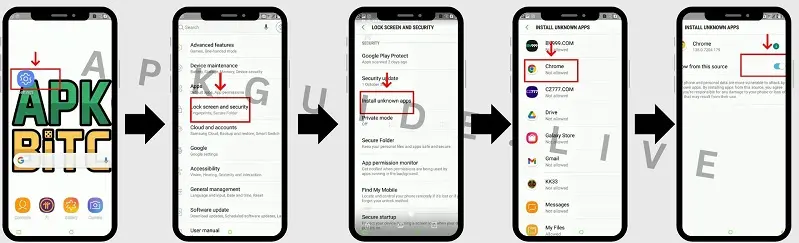
How to Install APK on Android (Step by Step)
Step 1: Download the APK File
First, download the APK file from a trusted website like APK Guide. Make sure the file is safe and compatible with your Android device.
Step 2: Enable Install Unknown Apps
Android blocks APK installs by default. To allow installation:
- Go to Settings
- Open Security or Privacy
- Tap Install Unknown Apps
- Choose your browser or file manager.
- Turn on Allow from this source
Step 3: Open the APK File
- Go to your Downloads folder
- Tap on the downloaded APK file
Step 4: Install the App
- Tap Install
- Wait a few seconds for the installation to finish.
Step 5: Open the App
Once installed, tap Open or find the app icon on your home screen.
Important Tips Before Installing APK Files
- Always download APKs from trusted sources.
- Avoid mod or cracked apps if you care about security.
- Keep your Android system updated.
Final Words
Installing APK files on Android is quick and simple if you follow the correct steps. This method helps users enjoy more control over apps and updates without depending only on the Play Store.